Now that we are all back in the groove, it is time for a new Friday Five of quick tips regarding Canvas. This edition of the Friday Five includes 3 tips worth repeating, 1 fun tip, and 1 HUGE (well maybe not huge, but hopefully helpful!) announcement.
Three Tips Worth Repeating!
1. Hiding Unneeded Courses on Your Dashboard: If you haven’t hidden courses you are likely finding your dashboard very cluttered. When your schedule is transferred from PowerSchool to Canvas, Canvas can not distinguish between a “real class” and your prep or lunch period. To hide the course shells that are for your prep or duty, follow these steps:
- Go to Courses in your Green Navigation bar, then select All Courses
- Click on the Star (make them orange) next to the the Courses you want to see on your dashboard
- Return to your Dashboard and see just the classes you want to be able to access quickly
2. Renaming Sections: Your course sections (periods) come across with PowerSchool coding rather than period numbers. To rename your sections to a more user-friendly format, follow these steps:
- Go into a course with multiple periods (sections)
- Click on Settings in the Course navigation, then select sections from the top of the screen
- Click the Pencil icon next to the section you want to rename
- Type in a more friendly name (like period number) and hit enter. Repeat this step for all sections
3. Modules: Utilizing Modules is the new goal for this year. Remember that if you get in the habit of adding all materials to your course through the Module interface, your course will be naturally organized for your students and for you. When utilizing Modules remember these three things:
- If a Module is locked, students can’t get to items inside it, even if the items are published
- When using Modules, you do not need to (and don’t want to) leave Files and Pages accessible for student access. They can get your files and pages through your Modules
- If you haven’t done so, complete the Module on Modules in the Professional Learning Course for Module Examples, Tips, and Tricks!
Fun Tip
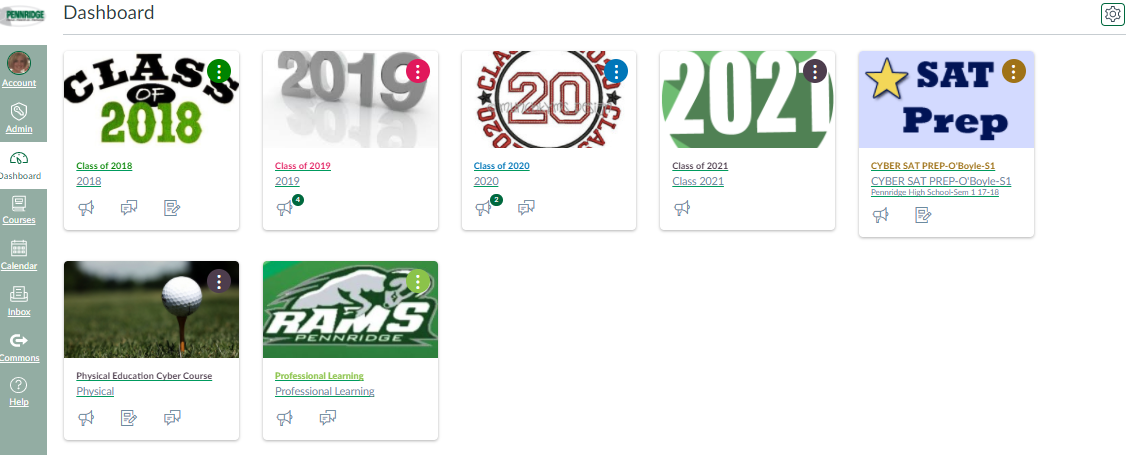
4. This Fun Tip is a discovery first made by Carol Ressler! This tip is totally about aesthetics, but if you have added course images to your course cards (tiles on your dashboard), you can take away the color overlay for a crisper view of your images. To do this, click on the gear icon found on the upper right of your dashboard and then deselect “Color Overlay”. This is a user setting, so feel free to wow your students by showing them how to do this on their dashboards.
 |
| Before |
 |
| After |
Huge Announcement
5. To further support you all in your Canvas use, in addition to Friday Fives, I am now going to offer Tuesday Tens. On select Tuesdays, I will be hosting ten minute quick overviews of key features in Canvas. These live,voluntary events will take place in the CAP Room (307) on select Tuesdays from 2:20-2:30. (I won't kick anyone out who wants to stay longer!) All events will be listed on the Professional Learning Calendar in Canvas. No need to RSVP, just show up. The first events will be:
September 19: SpeedGrader: Get a quick introduction into the time saving features of SpeedGrader. You may never collect papers again!
September 26: Course and Section Naming: Learn how to customize your course names and section names. Other account settings will also be reviewed
October 3: Module Magic: Get help making your modules magical for you and your student. Modules make everything simpler.


